> ## Documentation Index
> Fetch the complete documentation index at: https://docs.greetmate.ai/llms.txt
> Use this file to discover all available pages before exploring further.
# Phone Numbers
> Configure your new voice agent in under 5 minutes
## Agents
Each agent in Greetmate is a separate entity that can be configured to handle different types of calls. You can create multiple agents to handle different types of calls, such as sales, support, or billing.
### Phone numbers
Each agent will start off with an extension number during your free trial period. You can also assign a dedicated phone number to each agent once you've provided your payment information.
#### 1. Generic Number (Extension Number)
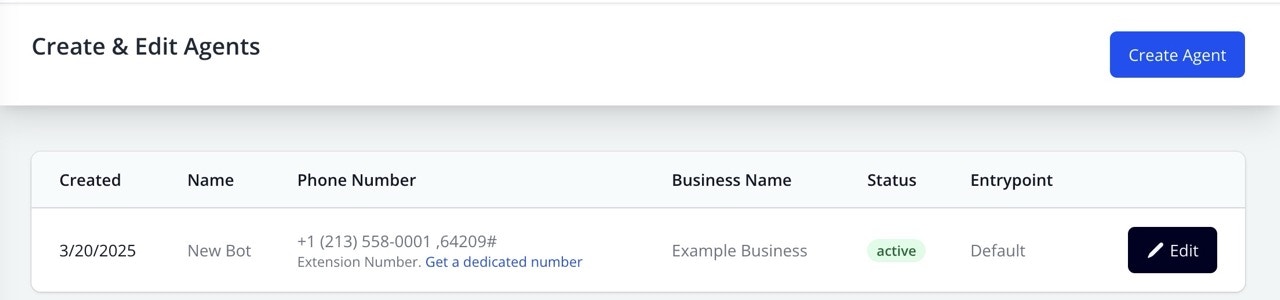 You can find your bot's extension number in the dashboard. This number is unique to your bot and can be used to make calls. Upon calling the generic number you'll have to enter the extension number to reach your bot.
#### 2. Dedicated Phone Number
You can find your bot's extension number in the dashboard. This number is unique to your bot and can be used to make calls. Upon calling the generic number you'll have to enter the extension number to reach your bot.
#### 2. Dedicated Phone Number

 Once you've provided your payment information, you can assign a dedicated phone number to your bot. This number can be used to make calls directly to your bot without having to enter an extension number.
To do so,
1. Go to the [Agent Overview](https://www.greetmate.ai/bot/settings)
2. Click on the agent you want to assign a dedicated number to
3. Click on the `Get a dedicated number` button
#### 3. Porting a phone number
If you have an existing phone number that you'd like to use with Greetmate, you can port it to our platform. To do so, reach out to our support team at [support@greetmate.ai](mailto:support@greetmate.ai)
Once you've provided your payment information, you can assign a dedicated phone number to your bot. This number can be used to make calls directly to your bot without having to enter an extension number.
To do so,
1. Go to the [Agent Overview](https://www.greetmate.ai/bot/settings)
2. Click on the agent you want to assign a dedicated number to
3. Click on the `Get a dedicated number` button
#### 3. Porting a phone number
If you have an existing phone number that you'd like to use with Greetmate, you can port it to our platform. To do so, reach out to our support team at [support@greetmate.ai](mailto:support@greetmate.ai)