> ## Documentation Index
> Fetch the complete documentation index at: https://docs.greetmate.ai/llms.txt
> Use this file to discover all available pages before exploring further.
# Make outgoing calls with the API
> This guide will help you make outgoing calls using the Greetmate API.
If you're not looking to build API reference documentation, you can delete
this section by removing the api-reference folder.
## 1. Create an API Key
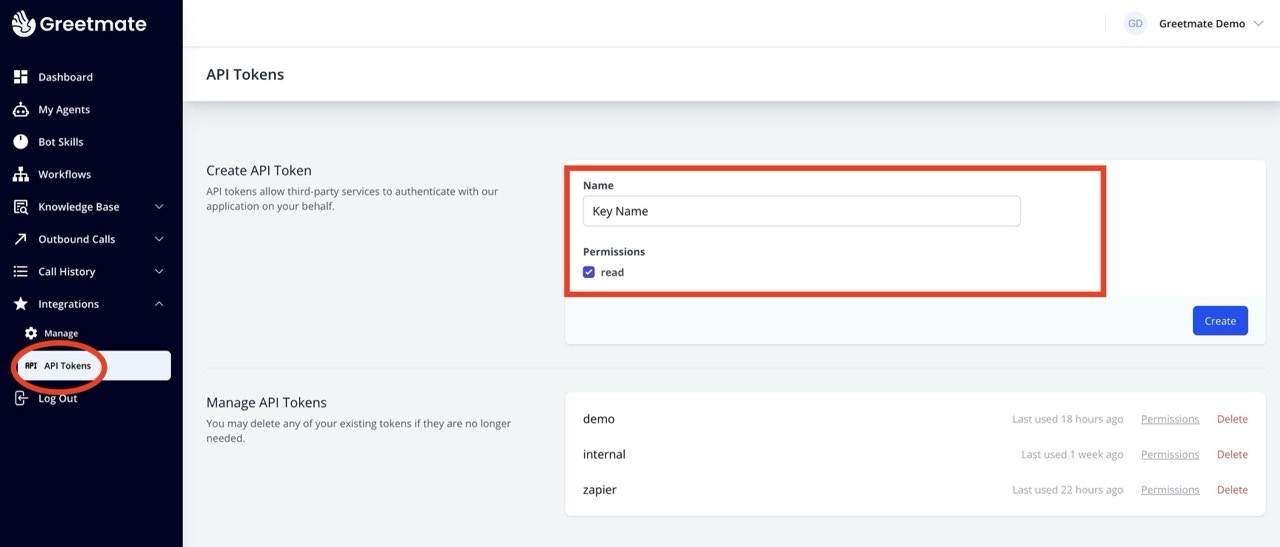
To make outgoing calls, you need an API key. You can create an API key by click on "API Tokens" under "Integrations".
Create a new key and copy it to your clipboard.
 ## 2. Refer to `Make call` endpoint
The `make-outgoing-call` endpoint is used to make outgoing calls. The endpoint is a `POST` request that requires the following parameters:
See docs for the [Make Call endpoint](/api-reference/endpoint/make-outgoing-call).
## 2. Refer to `Make call` endpoint
The `make-outgoing-call` endpoint is used to make outgoing calls. The endpoint is a `POST` request that requires the following parameters:
See docs for the [Make Call endpoint](/api-reference/endpoint/make-outgoing-call).